
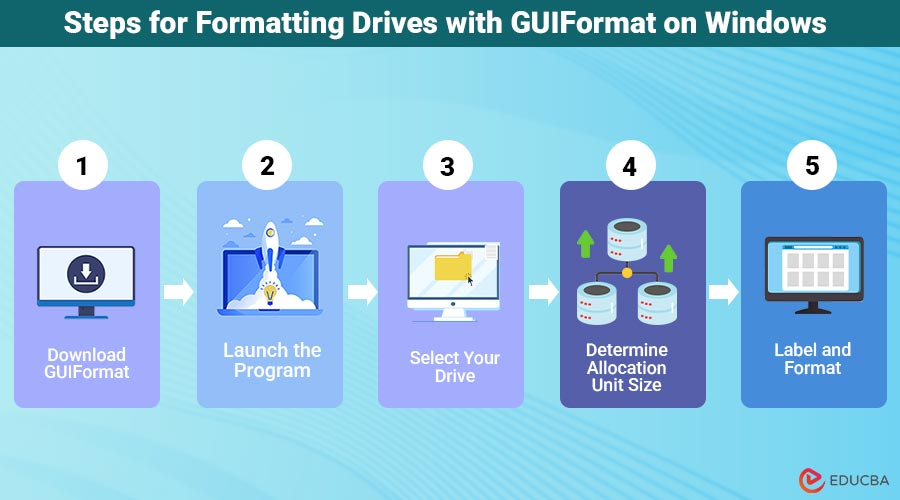
Guiformat is one of the most popular tools used for formatting storage devices into the FAT32 file system. Many users rely on it because Windows built-in formatting tools restrict FAT32 formatting for drives larger than 32GB. Guiformat removes this limitation and allows users to create FAT32 partitions on large USB drives, SD cards, and external hard drives quickly and easily.
As Windows 11 becomes more widely used, many users want to know whether Guiformat is compatible with Microsoft’s latest operating system. The good news is that Guiformat generally works well on Windows 11 and continues to provide the same FAT32 formatting capabilities that users have relied on for years.
Its lightweight design, portability, and ease of use make it a practical option for Windows 11 users who need FAT32 compatibility for gaming consoles, smart TVs, cameras, firmware updates, and other devices.
Understanding Guiformat
Guiformat is a small utility designed specifically for FAT32 formatting. The software is often called FAT32 Format because its primary purpose is to create FAT32 partitions on storage devices larger than 32GB.
Windows normally limits FAT32 formatting through File Explorer and Disk Management, even though FAT32 itself supports much larger partitions. Guiformat bypasses this restriction and allows users to format large drives into FAT32 without difficulty.
The software is especially useful for users who need maximum compatibility across different operating systems and electronic devices.
Does Guiformat Support Windows 11?
Yes, Guiformat generally works on Windows 11. Most users can download the software, launch it normally, and format drives without major compatibility problems.
Because Guiformat is a lightweight and portable application, it does not depend heavily on complex system components. Windows 11 can usually run the software just like previous versions of Windows such as Windows 10, Windows 8, and Windows 7.
Users typically only need administrator permission to allow the software to access storage devices for formatting purposes.
Why Windows 11 Users Need Guiformat
Even though Windows 11 includes built-in formatting tools, the FAT32 limitation still exists. When users attempt to format large USB drives through Windows File Explorer, they often only see NTFS or exFAT as formatting options.
This becomes a problem for users who need FAT32 compatibility. Many gaming consoles, smart televisions, multimedia players, cameras, routers, and embedded systems still rely on FAT32-formatted drives.
Guiformat solves this issue by allowing Windows 11 users to create FAT32 partitions on large drives such as 64GB, 128GB, and even larger storage devices.
Because of this capability, the software remains highly useful even on modern Windows systems.
Installation and Portability on Windows 11
One reason Guiformat works smoothly on Windows 11 is its simple and portable design. The software usually does not require installation. Users simply download the executable file and run it directly.
This portability reduces compatibility issues because the program does not make major changes to the Windows operating system. It also avoids unnecessary background services or complicated installation processes.
Technicians and advanced users especially appreciate this feature because they can carry Guiformat on portable drives and use it across multiple Windows 11 computers.
How Guiformat Works on Windows 11
Using Guiformat on Windows 11 is very similar to using it on earlier versions of Windows. After launching the application, the software scans the computer for connected storage devices.
Users then select the drive they want to format and choose settings such as allocation unit size and quick format mode. Once the process begins, Guiformat removes the existing file system and creates a new FAT32 partition.
The software performs formatting quickly, especially when quick format mode is enabled. Large USB drives and SD cards can often be formatted within minutes.
FAT32 Compatibility Benefits
Many users continue using FAT32 because of its excellent compatibility. FAT32 works with Windows, macOS, Linux, gaming consoles, smart TVs, multimedia systems, cameras, and embedded hardware.
Some devices cannot properly recognize NTFS or exFAT storage devices, especially older hardware. FAT32 therefore remains the safest choice for portable drives that need to function across multiple platforms.
Windows 11 users often use Guiformat to maintain compatibility with these devices while still using modern computers.
Popular Among Gamers on Windows 11
Gaming communities continue to recommend Guiformat for Windows 11 users. Many gaming consoles and retro gaming systems require FAT32-formatted USB drives for updates, emulator files, media playback, and modifications.
PlayStation systems, Xbox consoles, and retro emulator devices are common examples where FAT32 compatibility is important.
Because Windows 11 still limits FAT32 formatting for large drives, gamers frequently rely on Guiformat as a solution.
Its reliability and simplicity have made it one of the most trusted FAT32 formatting tools in gaming communities.
Performance on Windows 11
Guiformat generally performs very well on Windows 11 systems. The software is extremely lightweight and uses very few system resources.
Because it focuses entirely on FAT32 formatting, it launches quickly and performs formatting operations efficiently. Many users report smooth performance even on older computers upgraded to Windows 11.
The actual formatting speed depends more on the storage device and USB connection type than on the operating system itself.
Administrator Permissions in Windows 11
Like many formatting utilities, Guiformat may require administrator permissions on Windows 11. This is normal because formatting software needs low-level access to storage devices.
When users launch the application, Windows 11 may display a User Account Control warning asking for permission to run the software. Users can simply approve the request if they trust the download source.
This security behavior is standard for formatting tools and does not indicate a problem with the software.
Is Guiformat Safe on Windows 11?
Guiformat is generally considered safe when downloaded from trusted sources. The software has been used for many years and has built a strong reputation among Windows users.
Because it directly formats storage devices, users should always back up important files before using it. Formatting permanently erases existing data on the selected drive.
Users should also carefully verify the selected drive to avoid accidental formatting of the wrong storage device.
Downloading the software from reputable websites and scanning files with antivirus software are also recommended safety practices.
FAT32 Limitations Still Apply
Although Guiformat works well on Windows 11, users should remember that FAT32 itself still has limitations.
The biggest limitation is the 4GB maximum file size. FAT32 cannot store individual files larger than 4GB. This can be problematic for large videos, modern games, and software backups.
FAT32 also lacks advanced features such as encryption, journaling, and file permissions available in NTFS.
Despite these limitations, FAT32 remains highly valuable because of its compatibility advantages.
Comparing Guiformat with Windows 11 Built-In Formatting
Windows 11 built-in formatting tools are reliable for general use but still restrict FAT32 formatting for large drives. Guiformat fills this gap by extending FAT32 formatting support.
Unlike complex disk management utilities, Guiformat focuses specifically on FAT32 formatting. This focused functionality makes it easier and faster for users who only need FAT32 compatibility.
Many users prefer Guiformat because it solves a specific problem without unnecessary complexity.
Why Guiformat Remains Relevant
Even though newer file systems like NTFS and exFAT exist, FAT32 compatibility remains important for many devices. Because Windows 11 still includes FAT32 formatting restrictions, users continue needing third-party tools like Guiformat.
The software remains relevant because it provides a lightweight, reliable, and easy-to-use solution for formatting large drives into FAT32.
Its popularity among gamers, technicians, photographers, and multimedia users ensures that it continues to be widely recommended.
Conclusion
Guiformat works well on Windows 11 and remains one of the best tools for formatting large storage devices into the FAT32 file system. The software bypasses Windows FAT32 formatting limitations and allows users to create FAT32 partitions on large USB drives, SD cards, and external hard drives easily.
Its lightweight design, portability, fast performance, and beginner-friendly interface make it highly practical for Windows 11 users. Whether someone needs FAT32 compatibility for gaming consoles, smart TVs, firmware updates, cameras, or multimedia devices, Guiformat continues to provide a reliable solution.
