
Tegra-powered devices, especially the Nintendo Switch, opened the door to custom firmware, homebrew applications, and advanced tweaking through boot-level access. For users looking to inject payloads and manage custom software, tools like TegraRCMGUI have become essential. But with multiple payload injectors available, from SX Loader to Rekado, a pressing question rises—how does TegraRCMGUI truly stack up?
This article breaks down TegraRCMGUI’s features, compares it with other payload injection utilities, and explores its advantages and limitations in real-world scenarios.
Designed for Efficiency and Simplicity
TegraRCMGUI stands out by combining a graphical user interface (GUI) with the power of TegraRcmSmash, an open-source tool for payload injection. The goal is clear: deliver a seamless experience for Windows users who want to interact with their Nintendo Switch in Recovery Mode (RCM).
Unlike command-line tools, TegraRCMGUI simplifies the process. No need for complex syntax or terminal instructions. With just a few clicks, users can drag and drop payloads, view device status, and launch customized commands. Its plug-and-play design makes it beginner-friendly, yet flexible enough for advanced users.
Streamlined Payload Injection
Payload injection is the core of TegraRCMGUI’s function. It allows you to send .bin files—such as Hekate, Atmosphere, or custom payloads—to the Nintendo Switch while it’s in RCM mode. This unlocks various modifications, from bootloader customization to NAND backups and emuMMC setup.
Compared to tools like Rekado on Android or NXLoader, TegraRCMGUI provides consistent success rates when dealing with boot-critical payloads. Because it uses a reliable driver setup (like Zadig for USB driver replacement), the chances of connection failure or corrupt payloads are significantly lower.
Intuitive User Interface
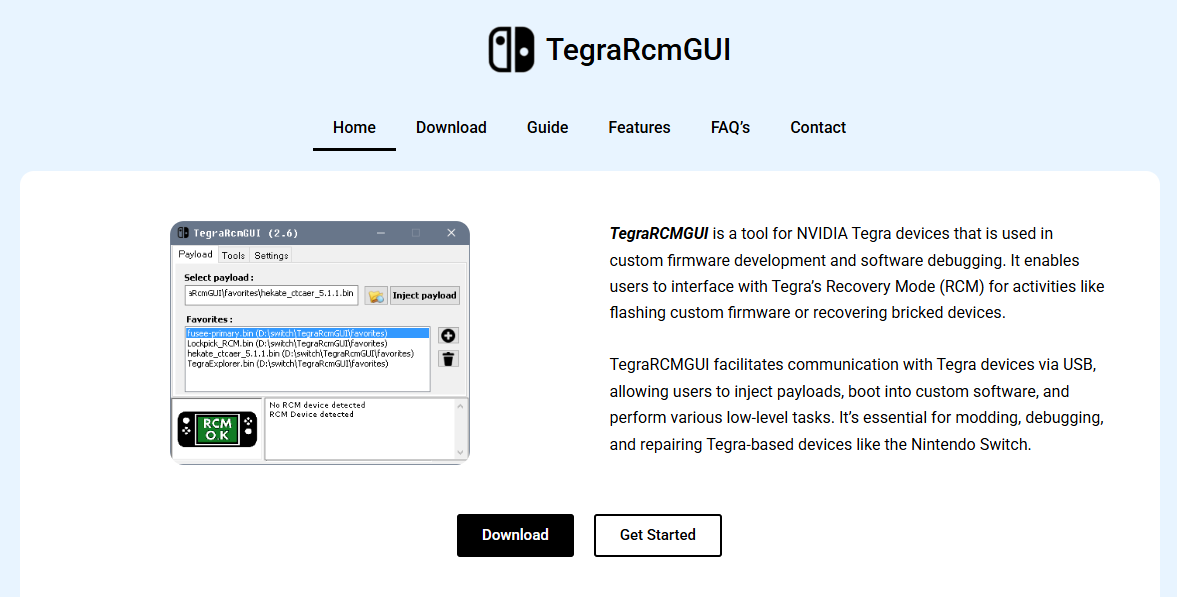
TegraRCMGUI’s interface is built with clarity in mind. Tabs are divided logically—Payload, Settings, and Tools—giving users quick access to what matters. Under Payload, you can manage, add, or send files. Under Tools, additional utilities like a screenshot grabber or battery monitor are sometimes included depending on version.
In contrast, many alternatives either clutter the interface or rely entirely on command prompts, leaving new users overwhelmed. TegraRCMGUI’s design choices make it more approachable without sacrificing functionality.
Platform Compatibility and Limitations
One of the biggest drawbacks is that TegraRCMGUI is Windows-exclusive. Users running macOS or Linux must resort to other tools or attempt compatibility layers like Wine, which isn’t always reliable for USB drivers.
Tools like Fusee-launcher and TegraRcmSmash support multiple operating systems and can be more flexible for cross-platform environments. However, they require command-line proficiency. For users tied to Windows, TegraRCMGUI remains the go-to solution, but for broader compatibility, others may offer a better fit.
Driver Setup and Installation Process
Initial setup involves installing the correct USB driver (libusbK or WinUSB) to communicate with the device. TegraRCMGUI offers a built-in driver installation wizard, simplifying what could otherwise be a confusing task.
Comparatively, other tools either skip this step or require manual downloads and device-specific matching. With TegraRCMGUI, users are guided through it with prompts and safety checks, reducing the risk of bricking the connection.
Support for Multiple Payloads
TegraRCMGUI supports storing and managing multiple payloads, making it ideal for users who switch between different custom firmware or recovery tools. You can save frequently used payloads and select them from a dropdown menu instead of browsing through folders each time.
While Rekado also supports multiple payloads, it’s mobile-based and sometimes limited by Android USB support. Desktop alternatives may lack this organized menu system, requiring users to repeatedly drag and drop payload files.
AutoRCM Functionality
Some versions of TegraRCMGUI include support for AutoRCM—an option that modifies the Switch to boot directly into RCM without needing the jig every time. This feature saves effort but comes with warnings about potential power draw issues or soft-bricks if misused.
The tool includes clear labels, confirmations, and backup reminders before enabling AutoRCM. Not all tools provide such a protective layer, leaving users at risk if they aren’t aware of what AutoRCM does. TegraRCMGUI takes an extra step toward safety and informed use.
Security and Source Code Transparency
Although TegraRCMGUI uses a closed GUI wrapper, it’s built on top of TegraRcmSmash, which is open-source. This hybrid approach balances user-friendliness with trust—users know the payload delivery engine is community-audited.
Tools like fusee-launcher and TegraRcmSmash offer complete transparency but require technical expertise to operate. Fully closed-source injectors may pose risks, especially if the executable contains telemetry or bundled adware. TegraRCMGUI has consistently maintained a clean reputation.
Update Frequency and Community Support
TegraRCMGUI has maintained periodic updates to stay compatible with new firmware versions and payload types. The developer community surrounding it provides forums, GitHub issues, and support groups for troubleshooting and improvement.
Other tools—especially Android-based injectors—sometimes lag behind or become abandoned after a year or two. Rekado, for instance, hasn’t seen major updates in recent cycles. TegraRCMGUI’s continued relevance makes it more reliable for long-term use.
Real-World Use Cases
Gamers, modders, and developers commonly use TegraRCMGUI for launching:
- Hekate bootloader (for multi-boot and NAND backups)
- Atmosphere CFW (for homebrew and modding)
- Linux distributions like Ubuntu or Lakka
- Recovery tools for bricked Switch consoles
In all these scenarios, success depends on quick payload delivery, device recognition, and stability. TegraRCMGUI consistently delivers, especially in controlled Windows environments.
Mobile Injection Tools: A Convenient Rival?
Rekado, an Android-based injector, has become a favorite for mobile users. It enables on-the-go payload delivery without needing a laptop. However, its compatibility depends heavily on USB-OTG support and Android kernel behavior. Not all phones handle payload injection reliably.
TegraRCMGUI, while not mobile, avoids those uncertainties. It ensures full control, robust USB detection, and higher success rates. For mission-critical payloads like bootloaders or system restorers, many users prefer the desktop route.
Performance Benchmarks
In informal tests, TegraRCMGUI matches or exceeds other tools in injection speed and consistency. Delays in recognizing the device are rare, and once drivers are installed properly, the software maintains a stable connection.
Compared to manual command-line options, which sometimes require restarting or switching USB ports, TegraRCMGUI saves time and minimizes errors. Especially in repeated usage scenarios—like mod shops or developers testing builds—it proves its worth.
Usability for Beginners
First-time users often find command-line tools intimidating. The learning curve around arguments, paths, and syntax deters many from exploring custom firmware. TegraRCMGUI lowers that barrier by offering:
- Drag-and-drop support
- Clear status messages
- Visual driver checks
- Easy payload management
This beginner-friendly environment is why many tutorials and video guides recommend TegraRCMGUI as the first step into Switch modding.
Risks and Warnings
As with any tool involving low-level device access, risks exist. A wrong payload or misused AutoRCM can leave your Switch in an unbootable state. TegraRCMGUI attempts to reduce that risk with file verification, helpful tooltips, and warnings before critical actions.
Still, users must read instructions and use trusted payloads. No injector—GUI or CLI—can guarantee absolute safety. However, TegraRCMGUI’s interface helps prevent common mistakes better than most alternatives.
Community Trust and Reputation
The Switch modding scene is tight-knit, and trust plays a major role in tool adoption. TegraRCMGUI has built a strong reputation through years of reliable performance, consistent updates, and a clean, malware-free distribution history.
Other injectors have suffered from shady forks, compromised download links, or abandoned maintenance. In contrast, TegraRCMGUI has remained a community favorite due to its dependability and openness about its internals.
Final Verdict
TegraRCMGUI is not just a convenience tool—it’s a carefully crafted utility that balances usability, performance, and stability. While not perfect due to its Windows-only nature, it leads the pack in most categories: ease of use, reliability, setup process, and long-term support.
For Windows users seeking a simple and safe way to inject payloads into their Switch, TegraRCMGUI is arguably the best choice available. Other tools may shine in specific scenarios—like mobile injection or multi-platform support—but TegraRCMGUI remains the preferred solution for the majority of Switch enthusiasts and developers.
